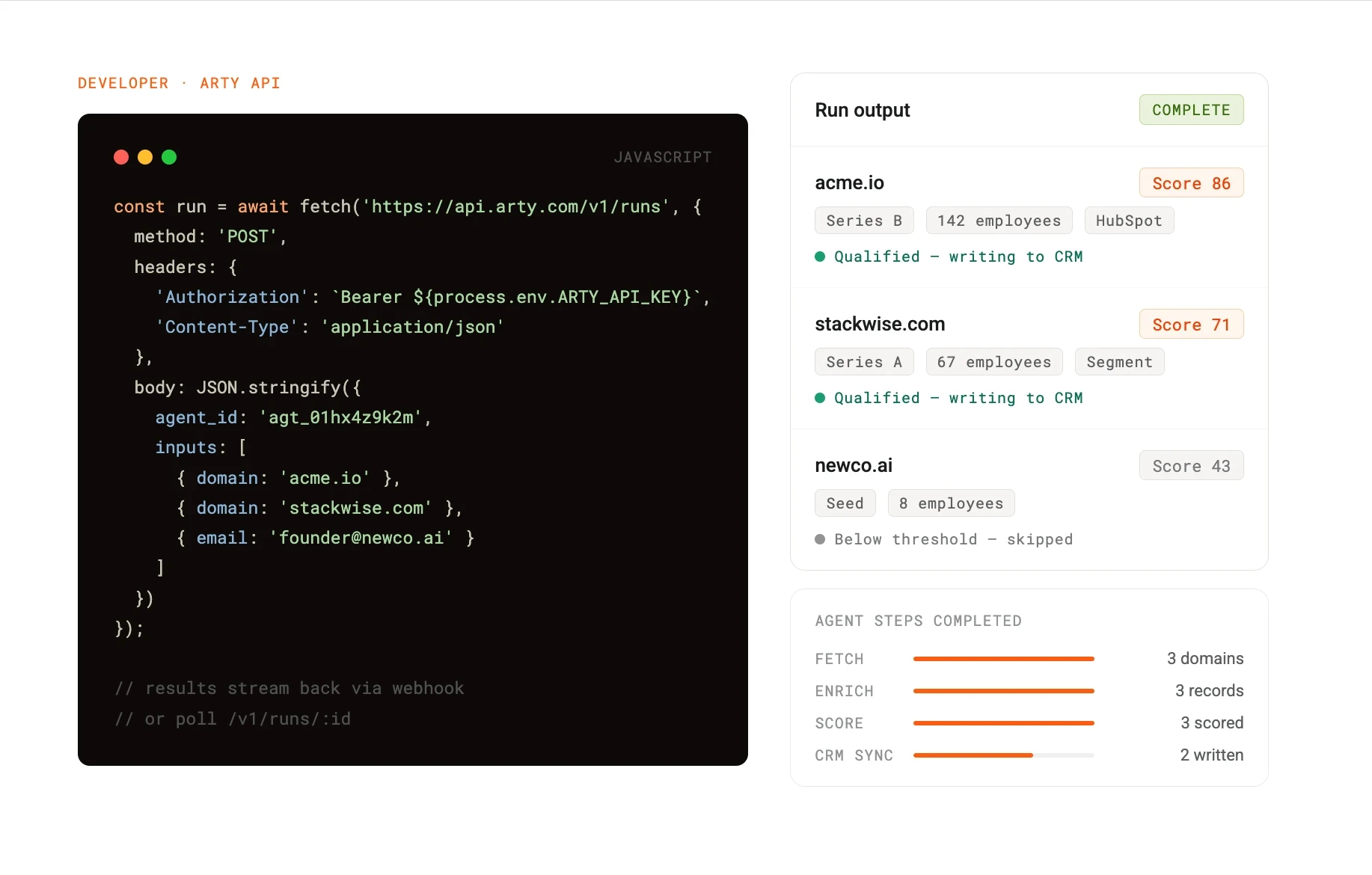
The Arty API gives you access to 30+ production-ready agents via a single REST interface. In this post we will walk through authenticating, configuring a lead intelligence agent, triggering a run, and handling the response. The whole thing takes under an hour to have running in a real environment.
This guide assumes you are comfortable with REST APIs and JSON. No prior experience with Arty is required.
The lead intelligence agent takes a company domain or a list of contact records as input and returns enriched data: company size, funding stage, tech stack signals, recent hiring activity, and a qualification score based on criteria you define. It connects natively to HubSpot, Salesforce, and most major CRMs to write results back automatically.
You configure the scoring model once. After that, every new lead that enters your pipeline gets scored and enriched without anyone touching it.
All API requests require a Bearer token. Generate one from the API section of your Arty dashboard, or from the Developer sandbox if you are on the free tier.
Store it as an environment variable. Never hardcode it.
export ARTY_API_KEY=your_api_key_here
export ARTY_API_KEY=your_api_key_here
export ARTY_API_KEY=your_api_key_here
Before you can run an agent, you need to create a configuration that tells it what to look for and how to score results. Send a POST request to /v1/agents with the agent type and your scoring parameters.
const response = await fetch('https://api.arty.com/v1/agents', {
method: 'POST',
headers: {
'Authorization': `Bearer ${process.env.ARTY_API_KEY}`,
'Content-Type': 'application/json'
},
body: JSON.stringify({
type: 'lead-intelligence',
name: 'Series A SaaS qualifier',
config: {
target_company_size: { min: 50, max: 500 },
funding_stages: ['series-a', 'series-b'],
tech_signals: ['hubspot', 'segment', 'intercom'],
score_weights: {
company_size: 0.3,
funding_stage: 0.4,
tech_stack_match: 0.3
},
score_threshold: 70
}
})
});
const agent = await response.json();
console.log(agent.id); const response = await fetch('https://api.arty.com/v1/agents', {
method: 'POST',
headers: {
'Authorization': `Bearer ${process.env.ARTY_API_KEY}`,
'Content-Type': 'application/json'
},
body: JSON.stringify({
type: 'lead-intelligence',
name: 'Series A SaaS qualifier',
config: {
target_company_size: { min: 50, max: 500 },
funding_stages: ['series-a', 'series-b'],
tech_signals: ['hubspot', 'segment', 'intercom'],
score_weights: {
company_size: 0.3,
funding_stage: 0.4,
tech_stack_match: 0.3
},
score_threshold: 70
}
})
});
const agent = await response.json();
console.log(agent.id); const response = await fetch('https://api.arty.com/v1/agents', {
method: 'POST',
headers: {
'Authorization': `Bearer ${process.env.ARTY_API_KEY}`,
'Content-Type': 'application/json'
},
body: JSON.stringify({
type: 'lead-intelligence',
name: 'Series A SaaS qualifier',
config: {
target_company_size: { min: 50, max: 500 },
funding_stages: ['series-a', 'series-b'],
tech_signals: ['hubspot', 'segment', 'intercom'],
score_weights: {
company_size: 0.3,
funding_stage: 0.4,
tech_stack_match: 0.3
},
score_threshold: 70
}
})
});
const agent = await response.json();
console.log(agent.id); Store the returned agent.id — you will use it to trigger runs.
Pass an array of leads to the /v1/runs endpoint. Each lead needs at minimum a domain or an email address.
const run = await fetch('https://api.arty.com/v1/runs', {
  method: 'POST',
  headers: {
    'Authorization': `Bearer ${process.env.ARTY_API_KEY}`,
    'Content-Type': 'application/json'
  },
  body: JSON.stringify({
    agent_id: 'agt_01hx4z9k2m',
    inputs: [
      { domain: 'acme.io' },
      { domain: 'stackwise.com' },
      { email: 'founder@newco.ai' }
    ]
  })
});

const { run_id } = await run.json();
const run = await fetch('https://api.arty.com/v1/runs', {
method: 'POST',
headers: {
'Authorization': `Bearer ${process.env.ARTY_API_KEY}`,
'Content-Type': 'application/json'
},
body: JSON.stringify({
agent_id: 'agt_01hx4z9k2m',
inputs: [
{ domain: 'acme.io' },
{ domain: 'stackwise.com' },
{ email: 'founder@newco.ai' }
]
})
});
const { run_id } = await run.json();const run = await fetch('https://api.arty.com/v1/runs', {
method: 'POST',
headers: {
'Authorization': `Bearer ${process.env.ARTY_API_KEY}`,
'Content-Type': 'application/json'
},
body: JSON.stringify({
agent_id: 'agt_01hx4z9k2m',
inputs: [
{ domain: 'acme.io' },
{ domain: 'stackwise.com' },
{ email: 'founder@newco.ai' }
]
})
});
const { run_id } = await run.json();Runs are asynchronous. You can poll for results or use a webhook.
Poll the run status endpoint until status is complete, then read the results.
async function waitForRun(runId) {
while (true) {
const res = await fetch(`https://api.arty.com/v1/runs/${runId}`, {
headers: { 'Authorization': `Bearer ${process.env.ARTY_API_KEY}` }
});
const data = await res.json();
if (data.status === 'complete') return data.results;
if (data.status === 'failed') throw new Error(data.error);
await new Promise(r => setTimeout(r, 2000));
}
}
const results = await waitForRun(run_id);
async function waitForRun(runId) {
while (true) {
const res = await fetch(`https://api.arty.com/v1/runs/${runId}`, {
headers: { 'Authorization': `Bearer ${process.env.ARTY_API_KEY}` }
});
const data = await res.json();
if (data.status === 'complete') return data.results;
if (data.status === 'failed') throw new Error(data.error);
await new Promise(r => setTimeout(r, 2000));
}
}
const results = await waitForRun(run_id);
async function waitForRun(runId) {
while (true) {
const res = await fetch(`https://api.arty.com/v1/runs/${runId}`, {
headers: { 'Authorization': `Bearer ${process.env.ARTY_API_KEY}` }
});
const data = await res.json();
if (data.status === 'complete') return data.results;
if (data.status === 'failed') throw new Error(data.error);
await new Promise(r => setTimeout(r, 2000));
}
}
const results = await waitForRun(run_id);
For production use, webhooks are the better pattern. Set a webhook_url on the run request and Arty will POST results to your endpoint the moment the run completes.
If you have connected a CRM integration in the Arty dashboard, you can have the agent write enriched data and scores back automatically by adding a crm_sync block to your agent config.
config: {
crm_sync: {
provider: 'hubspot',
write_score_to_field: 'arty_lead_score',
write_qualified_to_field: 'arty_qualified',
only_sync_qualified: true
}
}config: {
crm_sync: {
provider: 'hubspot',
write_score_to_field: 'arty_lead_score',
write_qualified_to_field: 'arty_qualified',
only_sync_qualified: true
}
}config: {
crm_sync: {
provider: 'hubspot',
write_score_to_field: 'arty_lead_score',
write_qualified_to_field: 'arty_qualified',
only_sync_qualified: true
}
}With this in place, every lead that scores above your threshold gets updated in HubSpot automatically. No manual exports. No middleware.
The full API reference covers pagination, error codes, rate limits, and the complete list of configurable parameters for every agent type. The sandbox gives you a testing environment with real agent behaviour and no usage limits.
If you run into anything, the developer forum is the fastest place to get an answer.