

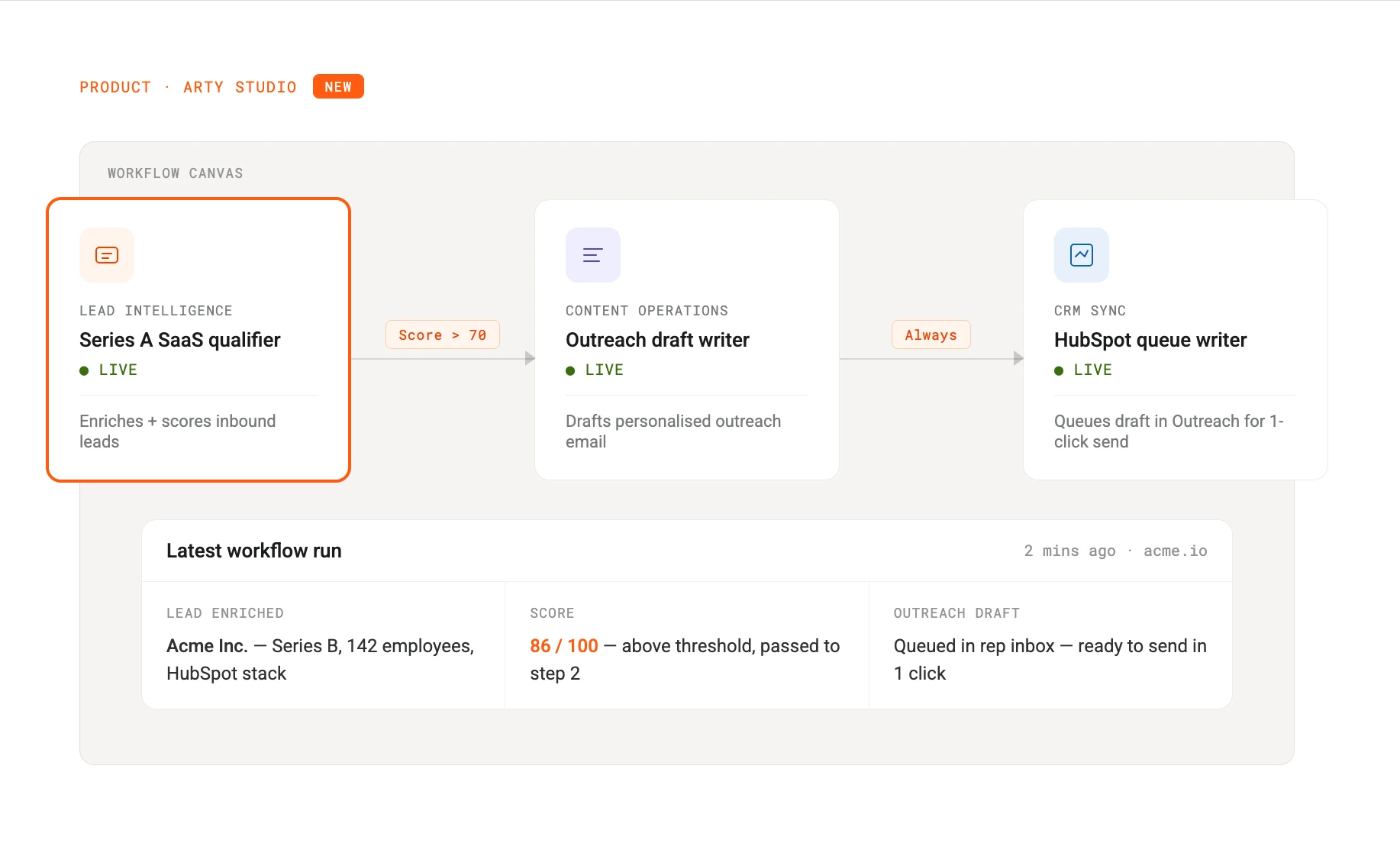
From today, Arty Studio supports multi-agent workflows — the ability to chain agents together so the output of one becomes the input of the next, without writing a single line of code.
This is the most requested feature we have shipped since launch. Here is what it does, how it works, and what it makes possible.
The problem it solves
Most real business processes are not a single action. They are a sequence. A lead comes in, gets enriched, gets scored, and then — if it meets the threshold — a personalised outreach draft gets written and queued in your CRM. That is three agents working in series.
Before today, you could run those agents separately and pass data between them manually, or use the API to chain them yourself. Neither option was fast or accessible for non-technical teams. Multi-agent workflows close that gap entirely.
How it works in Studio
In the Studio canvas, you can now connect any two compatible agents with a trigger arrow. When the first agent completes a run, its output is automatically passed as structured input to the next agent in the chain. You define the conditions: run always, run only if score above X, run only if a specific field is present.
The workflow runs in the background. You monitor it from the same dashboard you use for single agents. Each step in the chain logs its own outputs so you can inspect exactly what was passed and what came back.
What teams are already building
We ran a closed beta with 40 customers over six weeks before shipping this publicly. A few examples of what they built:
Lead qualification to outreach. A Series A fintech connected their lead intelligence agent to a content operations agent. Inbound leads are enriched and scored automatically. Those above the threshold trigger a personalised outreach email draft, written in the rep’s voice, queued in Outreach for one-click send. Their sales team is spending 40% less time on manual research per week.
Support triage to knowledge base. A B2B SaaS company chained their customer support agent to a content operations agent. When the support agent resolves a novel ticket, it automatically drafts a knowledge base article based on the resolution. Their support lead described the impact better than we could:
“We used to let resolved tickets pile up and do a knowledge base sprint every quarter. Now the articles just appear. We shipped more knowledge base content in the first two weeks of the beta than we did in the previous six months.”
— Priya Nair, Head of Customer Success, Meridian Labs
Competitive signal to internal brief. A marketing team connected their competitive monitoring agent to a data analysis agent. When a competitor publishes a significant update or a relevant news story is detected, an internal brief is automatically drafted and posted to their Slack channel. The team sees it before their morning standup.
What’s available at each tier
Multi-agent workflows are available on all paid plans. The number of agents you can chain in a single workflow depends on your tier.
Growth — up to 3 agents per workflow, up to 3 active workflows
Scale — up to 10 agents per workflow, unlimited active workflows
Enterprise — no limits, dedicated workflow engineering support
Developer sandbox users can build and test workflows with up to 2 agents at no cost.
How to get started
If you are on a paid plan, multi-agent workflows are live in your Studio now. Open any agent, click the new Connect button in the top right, and follow the setup flow. The first workflow takes about ten minutes to configure.
If you want to talk through the right workflow design for your use case, your account team can set up a working session. For new customers, the demo walks through a live multi-agent workflow end to end.